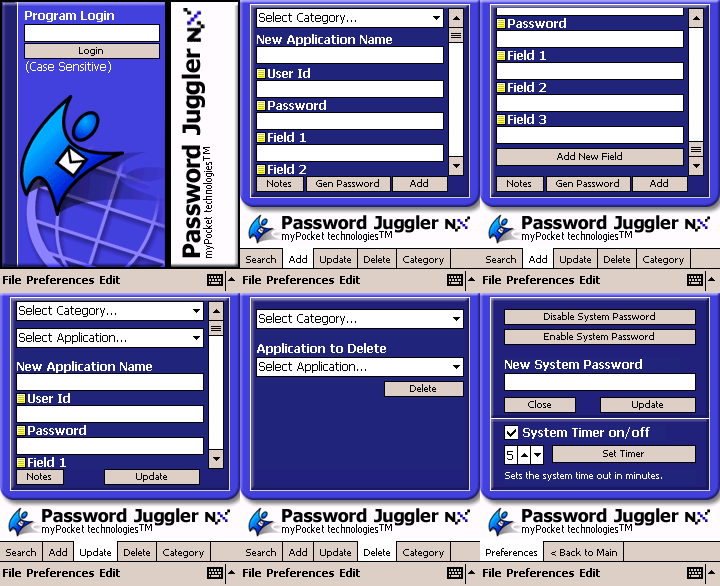
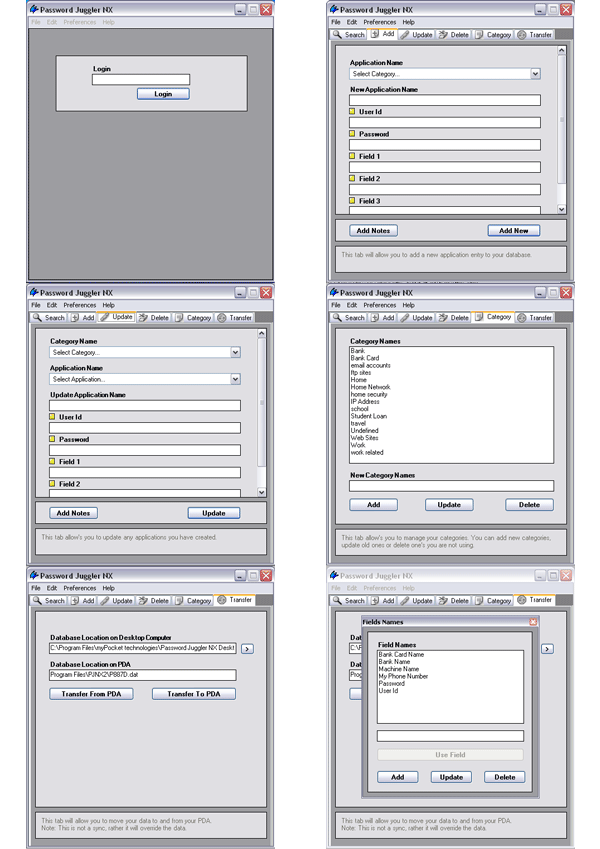
Password Juggler 2003 is a must have product… If you have to log in to any more than a few apps or four hundred remote locations, this app will satisfy all of your needs. With a gorgeous interface and a logical, well thought out work flow, it makes it easy to forget about all those annoying but necessary passwords. On a final note, I really like giving my hard earned money to people who back their products up, not only when things go wrong but when you present them with an interesting challenge. myPocket-technologies delivered in a crunch, from one developer to another, thanks Darren.Kevin — Novi, Michigan · March 2, 2003
Password Juggler — the Pocket PC password manager
If eWallets are too cumbersome but you need a reliable place to store passwords, Password Juggler NX stores every hard-to-remember password securely and makes them instantly available — on your PDA and your desktop. All information is encrypted, so no one but you can access it.
Password Juggler organizes your passwords in an easy-to-find manner: add, update, delete and view entries, attach notes, and (desktop version) export a hard copy for print. It was highly reviewed by PocketNow.com and ceWindows.net during the 2002–2003 Pocket PC era.
Store your software license keys, credit card numbers, secret telephone numbers, bank account details, IP addresses and computer logins — nearly every web site these days has a password, and Password Juggler keeps track of all of them.
Features
- Secure login feature
- Auto variable timed shut-off
- Categorized passwords
- Randomly generated passwords
- Add, update, delete, manage categories
- Copy/paste features
- Notes on every entry
- Customized fields
- Word search & note indicators (3.1.0)
- Transfer encrypted database PDA → PC (desktop)
- Print/export password reports (desktop)
- Web-enabled: updates, FAQ, email support (desktop)
Specification
- DevelopermyPocket technologies (Darren Mason)
- PlatformsPocket PC 2002/2003 (ARM) · Windows 95–XP
- SecurityEncrypted database, secure login, auto shut-off
- First released2001 · final: NX, June 2003
- Original price$9.99 PDA · $12.99 desktop · $19.99 combo
Purchase options (2003)
- Password Juggler [ARM Processor] — $9.99 PDA only
- Password Juggler Desktop Windows
- Password Juggler Combo [ARM Processor] — $19.99 PDA + Desktop
Manuals & files on this site
- Password Juggler NX Manual (.doc) Available
- Password Juggler NX Desktop Manual (.doc) Available
- Password Juggler 2003 Manual (.doc) Available
- Password Juggler NX Data Converter 1.0.0 (.zip) Available
Skins
The NX version shipped with swappable skins. The original skin archives were not preserved in the web archive:
- Green skin (.zip) unarchived
- Purple skin (.zip) unarchived
User reviews (2001–2003)
All six published reviews gave Password Juggler five stars.
Excellent app; terrific price-point Simple, almost elegant, interface. The perfect place to store all those zillions of software keys and passwords.ddpinkard@yahoo.com — Concord, CA · April 21, 2002
Nearly perfect in every detail. Simple/Clean/Quick/Safe Rarely do I give 5 stars and this one easily makes the grade. The app is clean looking with a well designed GUI and nice "windows" color complements. However, looks aren't the only thing going for it. It is super easy to use and the configurable categories ROCK! You can find competing apps that have more bells and whistles and other "stuff" but why? And for the price, you can't go wrong. The guy writing it also gave me personal attention to get it up and running on my Jornada 525… Kudos!michael@burnside.com — Ogden, UT · December 1, 2001
As a network admin, this program is invaluable! I've used other password holding programs, but this one does it all. The one of best features is that I can sync it with my PocketPC. Now I can lookup my network id's or site logins away from my desktop. The print feature is a great way to physically archive my data. The best feature is the support. I had a question and got an answer (the correct answer) right away. That says more about the program than anything else!Jim Martin — Houston, Texas · February 18, 2003
Quick, simple and elegant… oh yea and SAFE! I rarely give 5 stars, but here goes. This is by far the best password "juggler" you can find. Not just for the money, but for the functionality as well. The GUI is clean, with a nice choice of coloring as well as easy and simple to use. I had problems installing the beta and Darren worked the night trying to fix it… which he did!michael@burnside.com — Salt Lake City, Utah · December 6, 2001
Essential desktop companion Great addition to the Password Juggler; makes adding and backing up info even easier, and serves as a great resource for those increasingly necessary lists of passwords and (my favorite use) software keys.ddpinkard@yahoo.com — Concord, CA · April 22, 2002